Say goodbye to messy expense tracking. Transaction Rules customize spending and organize finances, taking all the hassle out of life. Your budget, your rules — literally!
Start your 7-day trial
Transaction Rules turn budgeting into a simple, clear, and enjoyable habit. Working quietly behind the scenes, they save you time so you can focus on what matters most.
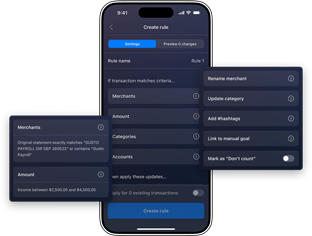
No more chaotic, mystery charges or guessing — transactions show up with crystal-clear, consistent names and land in the right categories.
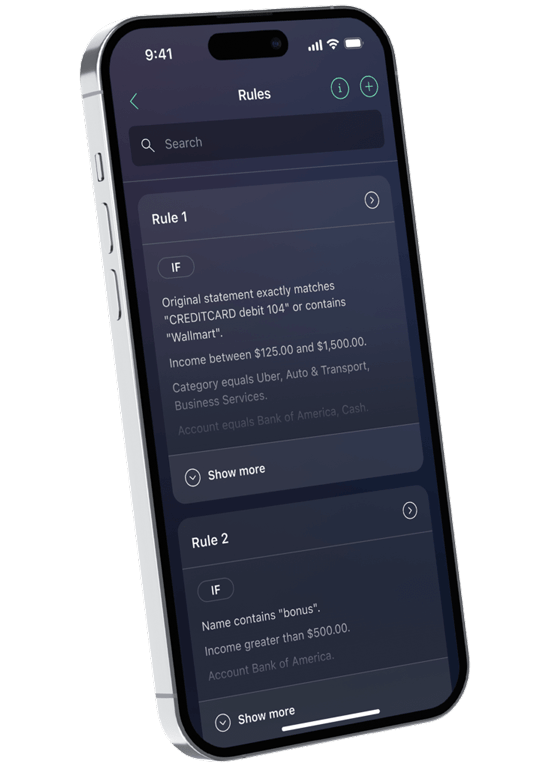
Set flexible conditions by merchant, amount, category, or account to separate different transactions from the same merchant or one-time payments from recurring bills.
Manage all your rules exactly how you prefer. Create, edit, or delete them anytime, directly in the app, as your financial needs change.
Label specific records with hashtags for quick reference or mark them as “Don’t count” so they're hidden from your budget calculations.
Choose to update only new, incoming entries or your entire transaction history. Rules operate instantly, keeping things in order.
Stack as many conditions as you need — filter by merchant and amount and account all at once. The more specific your rule, the smarter your budget gets.
Create a rule for a merchant or category and every future transaction sorts itself automatically — no manual fixing, ever again.
Rules rename transactions them automatically so you always know exactly what you spent money on.
Buy groceries and work lunches at the same store? Set separate rules to split them into the right categories so your budget stays accurate.
Apply a new rule to all past transactions at once — your full spending history becomes organized overnight, not just going forward.
Mark irregular or reimbursable transactions as "Don't count" so they don't skew your spending reports or mess with your budget totals.
Add custom hashtags to transactions for quick filtering — useful for tracking shared expenses, work costs, or anything you want to find fast later.
I used to spend 20 minutes every Sunday fixing transaction names and categories. Now I set a rule once and the app does it for me. Total game changer.
Anna P.
My bank labels everything with cryptic merchant codes. Transaction Rules cleaned up my whole history in minutes and now I actually understand where my money goes.
Ryan T.
I expense some purchases for work. Being able to tag them and exclude them from my personal budget means my reports are finally accurate.
Mia C.
“PocketGuard is highly automated, which means it requires less time and effort than many competing apps do. You'll be able to set up your account in just a few clicks.”
“The app’s easy-to-use interface, accessible pricing structure, spending alerts and recommendations make it excellent for improving your finances. That’s why it earned a spot on Forbes Advisors’ Best Budgeting Apps.”
They are smart instructions you set once to auto-organize expenses. Instead of you manually fixing the same recurring coffee charge every morning, the app uses these rules to instantly identify, rename, and sort your spending into the right buckets.
Banks often use internal codes that don't make much sense at a glance. Transaction rules help you organize messy bank transactions by stripping away that technical jargon and replacing it with a name you actually recognize — like "Morning Latte".
Absolutely. Once you link your accounts, our algorithm starts sorting your spending. For anything extra specific, you can set custom rules so the app knows exactly how to automatically categorize expenses for you in the future.
Open any transaction you want to fix and look for the option to create a rule. You can set flexible conditions based on the merchant, the amount, or even the specific account. Once you save it, you can choose to apply that change to only new transactions or go back and clean up your entire history in one click.
Yes! By ensuring every dollar lands in the right category, your budget charts and "Leftover" balance become much more accurate. You can also use rules to mark certain transactions as "Don't count".
Regular updates, new features, connectivity improvements!
Free Trial
Monthly
Annual
Lifetime
7 Days Free
$0 Try all premium features free for 7 days. No commitment.
PocketGuard Plus
$12.99/month
$155.88 per year, billed monthly
All prices in US Dollars
PocketGuard Plus
$6.25/monthSave $81/year
Billed $74.99 yearly
All prices in US Dollars
PocketGuard Plus
$149.99/lifetime
One-time payment, own it forever
All prices in US Dollars
Set it once. Forget it forever. Transaction Rules auto-rename, categorize, and tag your transactions by merchant, amount, or account – keeping your budget organized without manual cleanup. Everything you need to manage your money lives in one app.