
Goodbudget has a loyal following among people who like the envelope budgeting method, and its permanent free plan is genuinely rare in this category. But it also has real limits that push a lot of households to look for apps like Goodbudget that do more of the work automatically.
Table of Contents
Why People Look for a Goodbudget Alternative
One of the main limitations is manual entry. Goodbudget’s free tier has no automatic bank sync at all, so transactions have to be entered or imported manually. With Premium ($10/month or $80/year), you get bank sync on unlimited linked accounts, but for US banks only, and you still need to manage your spending across envelopes yourself. On top of that, the free plan caps you at 10 regular envelopes plus 10 additional envelopes and a single account, which is tight for a household juggling several spending categories, joint accounts, and savings goals.
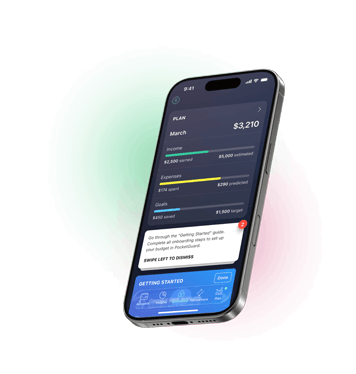
Take control of your money, optimize your spending and grow your savings automatically


None of this makes Goodbudget a bad app – it just means the free digital envelope system asks for more upkeep than some people want. That’s why some users may start searching for a Goodbudget alternative that keeps the envelope logic but automates the busywork.
PocketGuard – Goodbudget Alternative for Automated Budgeting
If your main frustration with Goodbudget is the manual side of things, PocketGuard is the most direct alternative to manual tracking and to Goodbudget itself. Here’s how it stacks up.
Automatic Bank Sync vs. Manual Entry
Goodbudget’s free plan doesn’t include automatic bank sync and requires manual transaction entry or import, and Premium links to US banks only. PocketGuard syncs automatically across more than 20,000 financial institutions across the US, Canada, and the UK on its paid plans, so balances and transactions update themselves instead of waiting on you to log them.
The “Leftover” Number Replaces Manual Envelope Math
In Goodbudget, you manage your spending by allocating funds across envelopes. PocketGuard also can give you envelopes, but its main feature calculates a running “Leftover” figure – what’s actually safe to spend after your bills, goals, and budgeted categories – and updates it automatically as transactions post. You don’t need to manually move money between envelopes to calculate what’s left to spend.
Other PocketGuard Features Users Love
- Debt Payoff Planner. Whereas Goodbudget tracks debt as a single running balance with a payoff date, but leaves you to work out the payoff order and strategy yourself, PocketGuard’s Snowball and Avalanche modes sequence multiple debts automatically.
- Automatic subscription detection, so recurring charges don’t quietly eat into your budget rollover.
- Custom spending categories and savings goals that update in real time.
- A “Pace” alert that flags when spending is outrunning income before the month ends.
Pricing: PocketGuard vs. Goodbudget Premium
PocketGuard runs $12.99/month, $74.99/year, or a one-time lifetime purchase of $149.99 – a pricing option Goodbudget doesn’t have. Goodbudget Premium is $10/month or $80/year. It’s worth being upfront about the trade-off: Goodbudget still has a real, permanent free plan, with one account and no automatic bank sync. PocketGuard has no free-forever tier, only a 7-day trial. If you specifically want a free tool and don’t mind manual entry, Goodbudget remains the better fit – that’s a fair reason to stick with it.
Security: Is PocketGuard as Safe as Goodbudget?
Security is a fair concern any time you’re comparing a manual app against one that connects directly to your bank. Goodbudget avoids the question on its free plan simply because there’s nothing to sync – you’re typing numbers into envelopes, not sharing credentials. PocketGuard, on the other hand, relies on bank-level connections (via aggregators like Plaid and Finicity) to pull transactions automatically, so it uses 256-bit encryption, read-only account access, and multi-factor login to keep that data locked down. If you’re comfortable with the same kind of bank-linking used by apps like Rocket Money, or your own bank’s mobile app, PocketGuard’s automatic sync offers a similar level of convenience while reducing the need for manual transaction entry.
Who PocketGuard Is Best For
PocketGuard suits people who want to see clearly how much money they will have by the end of the month or year and want their budget to run itself with minimum effort: multiple linked accounts, automatic categorization, and a single number that tells them what’s safe to spend today. It supports envelopes, 50/30/20, zero-based, and category budgeting. It’s less suited to someone who wants a completely free system and is happy to enter transactions by hand.
Another Goodbudget Alternative Worth Considering
For many people, the comparison stops there. If you’re still considering alternatives, two other options are worth a mention.
Honeydue – A Free Option for Couples Who Want Zero Manual Entry
Honeydue is built specifically for couples managing money together, and unlike Goodbudget’s free tier, it includes automatic bank sync at no cost. Partners can link accounts, set per-category spending limits, get bill reminders, and chat about transactions in-app, while choosing what balances and purchases stay private. It doesn’t use the envelope budgeting method the way Goodbudget does, so if envelopes are the whole point for you, this one’s a bigger shift.
Spreadsheets – For Full Manual Control
If the appeal of Goodbudget was really about full control and zero cost, a spreadsheet is the logical alternative. You can replicate envelope budgeting, track spending categories, and roll over unused amounts month to month exactly how you want – with no envelope limits, no account caps, and no subscription. The cost is that you also lose every bit of automation: no bank sync, no alerts, and every entry is on you.
Goodbudget Alternatives Compared
| Goodbudget | PocketGuard | Honeydue | Spreadsheets | |
| Budgeting method | Envelopes | Leftover, predictive budgeting, 50/30/20,zero-based, envelopes, category budgeting | Category spending limits | Fully customizable |
| Automatic bank sync | Premium only, US banks | Yes, all plans | Yes, free | No |
| Account / envelope limits | 10+10 envelopes, 1 account (free), Unlimited on Premium | No hard limits | No stated envelope limits | No budgeting-app limits |
| Price | Free $10 mo $80 annually | $12.99 mo $74.99 annually lifetime option | Free | Free |
| Free tier | Yes (manual) | 7-day trial only | Yes | Yes |
| Debt payoff tools | debt tracking, not a payoff planner | Yes (snowball/avalanche) | No | Manual |
| Savings goals | Basic | Automated tracking | Basic | Manual |
| Best for | Envelope fans | Automated everyday budgeting | Couples | Full DIY control |
Why PocketGuard Beats Goodbudget for Everyday Budgeting
For users who outgrow Goodbudget, the reasons are the same: they want automatic bank sync instead of manual entry, they want their leftover balance calculated for them instead of moved by hand, and they want built-in debt payoff tools. PocketGuard covers all three, plus a lifetime pricing option Goodbudget simply doesn’t offer. If manual envelope tracking has started to feel like a chore, it’s worth trying PocketGuard’s free trial and seeing whether its automatic syncing makes budgeting easier for you. You may find more details in our PocketGuard vs Goodbudget apps comparison.
Ready for a more automated approach to budgeting? Sign up for PocketGuard’s free trial and see your Leftover number update itself.
Goodbudget alternatives FAQ
Does PocketGuard support the envelope method like Goodbudget?
Yes, PocketGuard uses spending categories and hashtags, which provide a similar way to organize spending. Leftover feature achieves the same goal of knowing what’s left to spend, without relying on the envelope transfers used in Goodbudget.
Is PocketGuard easier than Goodbudget?
PocketGuard can be simpler for users who prefer more automation. You always know where you stand and how much you can spend without overthinking it.
Can couples use PocketGuard together like Goodbudget?
Yes, but not in the same way. PocketGuard has no dedicated partner-sharing feature, so couples share a single login and see one combined view, with no way to separate personal and joint spending.
Disclaimer: This content reflects information available at the time of publication. Prices, policies, features, and other details may have changed since then. Please check the latest information with official sources before making any decisions.

Take control of your money, optimize your spending and grow your savings automatically

