
Table of Contents
Why Look for an EveryDollar Alternative?
Most people searching for EveryDollar alternatives already like the idea behind the app. EveryDollar is built around Dave Ramsey’s zero-based budgeting method. In this tool, every dollar gets a job before you spend it. It’s a solid system, and a lot of people swear by this service. But there’s one thing that trips people up almost every time: bank sync isn’t part of the free version. You have to upgrade to EveryDollar Premium, which costs $79.99 a year or $17.99 a month to get it. Even with sync turned on, EveryDollar still requires you to create a new budget each month, although you can copy the previous month’s budget and adjust it.
In Debt.com’s 2026 Budgeting Survey, 34% of people who don’t budget said it’s too time-consuming. Maybe you want an alternative to EveryDollar that tracks spending automatically, or you’d rather pay off your highest-interest debt first instead of following the debt snowball. Probably you think that the debt snowball isn’t your thing, and you’d rather attack your highest-interest balance first. Below are the options actually worth your time in 2026, starting with the one we think handles EveryDollar’s biggest weak spot the best. If you like EveryDollar’s style budgeting approach and want a free option, Goodbudget is worth considering. If you want automation, start with PocketGuard.
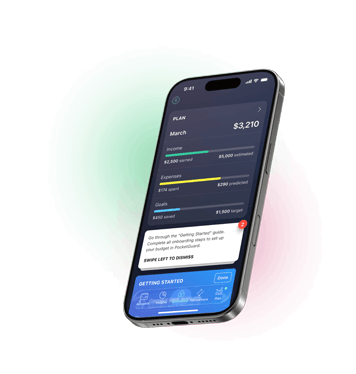
Take control of your money, optimize your spending and grow your savings automatically


Key takeaways:
- EveryDollar’s free plan is manual-only. Bank sync requires Premium at $79.99/year or $17.99/month.
- PocketGuard is our top EveryDollar alternative for automated budgeting. Its Leftover number shows what’s safe to spend after bills, goals, and savings.
- PocketGuard’s Debt Payoff Planner supports both avalanche and snowball, not just the Ramsey snowball method.
PocketGuard — A Top EveryDollar Alternative
PocketGuard doesn’t really try to outdo EveryDollar. It does something different: instead of asking you to plan your spending by category each month, it calculates a single number called “Leftover” — basically, what’s safe to spend right now after bills, goals, and the essentials are covered. That number updates on its own as transactions roll in. There’s no need to manually assign every dollar to a category at the start of each month just to see what you have left to spend.
How PocketGuard Compares to EveryDollar’s Zero-Based Method
Zero-based budgeting works, but it’s a chore: you have to assign every dollar before the month starts, and it requires more hands-on planning throughout the month.” While PocketGuard also supports zero-based budgeting, its Leftover feature is a genuinely different way of thinking about the same problem. It shows you money that’s free to allocate, so you can still give every dollar a job, keep a small flexible buffer, or split it into envelopes. For a feature-by-feature breakdown, see our PocketGuard and EveryDollar comparison.
Debt strategy is another spot where the two apps go separate ways. EveryDollar leans hard into Ramsey’s debt snowball which prioritizes the smallest balance first. PocketGuard’s Debt Payoff Planner lets you choose snowball or avalanche, so if the math says pay off your highest-interest card first, you’re not fighting the app to do it.
Bank Sync and Automation: What You Actually Get
Both apps can sync your bank accounts, but only on a paid plan. With EveryDollar, synced transactions still work within a monthly budget that you plan and adjust each month. PocketGuard uses the same data to update Leftover in real time, list upcoming bills on the Bills screen, and warn you mid-month with Pace if you’re drifting off plan. It supports about 18,000 financial institutions, in the US, UK, and Canada.
EveryDollar’s free plan really is free forever for manual budgeting. PocketGuard has no permanent free plan. You get a 7-day free trial, then subscribe for a month or a year, or buy Lifetime. So if you want a permanently free app and don’t mind typing in transactions, EveryDollar still wins that fight.
Pricing
PocketGuard Plus costs $12.99/month, or $74.99/year if you pay annually — call it about $6.25/month. That’s close to EveryDollar Premium. The bigger difference is PocketGuard’s one-time Lifetime plan at $149.99, which costs less than two years of EveryDollar Premium. PocketGuard also includes a net worth tracker that pulls in investment balances.
Who PocketGuard Is Best For
PocketGuard is the better fit if you want your budget to update itself, you’d rather spend less time adjusting your budget each month, or you’d rather choose avalanche over snowball. Couples budgeting works too: partners can tag shared spending and save toward shared goals, though there’s no separate couples mode. If you plan to manage your household finances for years, the Lifetime plan lets you avoid recurring subscription payments. Start your 7-day free trial and see how it feels before committing to anything.
Other EveryDollar Alternatives Worth Trying
PocketGuard isn’t the only reasonable option here. If you’d rather stick with an app built around zero-based budgeting, or you prefer the cash-envelope method, the two options below are worth a look. One costs less than EveryDollar Premium, and the other has a free plan that never expires.
CountAbout: Cheaper Zero-Based Budgeting With Bank Sync
CountAbout is worth a look if you actually like EveryDollar’s method for less than EveryDollar Premium. Premium, with automatic sync, runs $54.99/year; there’s also a manual-entry Basic plan at $19.99/year if you want to start cheaper. The trial is generous too — 45 days, versus EveryDollar’s 14 — and CountAbout throws in a few things EveryDollar doesn’t , like Quicken import, receipt attachments, and projected register balances.
Goodbudget: Envelope Budgeting
Goodbudget takes the old cash-envelope trick and puts it on your phone. The free plan gives you 20 envelopes, one account, and two devices. Unlike PocketGuard’s trial, it never expires. Premium is $10/month or $80/year and adds automatic bank sync for US bank accounts, unlimited envelopes and accounts, and more transaction history. It’s less about optimizing a plan and more about the “cash in an envelope” mental model, which some people find easier to stick with than a spreadsheet-style budget.
EveryDollar Alternatives Compared
| PocketGuard | CountAbout | Goodbudget | EveryDollar | |
| Budgeting Method | Predictive budgeting with Leftover feature; supports zero-based, envelope, categories, 50/30/20 | Zero-based | Envelope | Zero-based |
| Price | $12.99/mo or $74.99/yr, $149.99 lifetime | $19.99–$54.99/yr | Free, $10/mo or $80/yr | Free, $17.99/mo or $79.99/yr |
| Free Tier/Trial | 7-day trial only | 45-day trial | Yes, 20 envelopes, manual | Yes, manual only |
| Bank Sync Access | Plus and Lifetime | Premium | Premium, US banks only | Premium |
| Debt Payoff Tools | Snowball & avalanche | Loan Amortization & Payment Splitting | Snowball, Debt envelopes | Snowball only |
| Security | Bank-level encryption | Bank-level encryption | Bank-level encryption | Bank-level encryption |
Why PocketGuard Beats EveryDollar
If you’re ready to replace EveryDollar, the case for PocketGuard comes down to automation. Your Leftover number updates as you spend, so there’s no monthly rebuild, and the Debt Payoff Planner lets you pick avalanche or snowball. Bank sync comes with every paid plan, and the $149.99 Lifetime option means you can stop paying a subscription entirely. Start your 7-day free trial and judge for yourself.
EveryDollar Alternatives FAQ
Does PocketGuard require a bundle for bank sync like EveryDollar?
No. Bank sync is just part of the standard PocketGuard Plus plan and the 7-day free trial.
Can I use PocketGuard without following zero-based budgeting?
Yes. The “Leftover” number is calculated for you automatically, so you don’t have to hand-assign every dollar to a category just to see how much you have available to spend. If you like zero-based budgeting, you can still use it, or switch to category-based budgeting or envelopes instead.
Does PocketGuard work outside the US?
Yes. PocketGuard works in the US and Canada. In the UK, you can connect banks supported by our data partner Salt Edge, such as Monzo and Lloyds, though not every UK bank is covered yet.
Disclaimer: This content reflects information available at the time of publication. Prices, policies, features, and other details may have changed since then. Please check the latest information with official sources before making any decisions.

Take control of your money, optimize your spending and grow your savings automatically

